
Best new WoW Forever addons: 10 player-made picks from Reddit
The 10 most downloaded new WoW Forever addons that players built and shared on Reddit, from OpenMap to Happy Camper, with screenshots, pros and cons, checked October 31, 2026.
The quick answer
By CurseForge downloads on October 31, 2026, the best new WoW Forever addons that players built and posted on Reddit are OpenMap, Forever Loot Sparkles, Node Sight, Musca Auras, NeedRoll, Glowing Bars, PrettyTooltip, Keep or Toss: Forever, Social Diary and Happy Camper. Each has a WoW Forever file on CurseForge.
Guide details and editorial record
- For
- WoW Forever players choosing addons before launch
- Prerequisites
- The CurseForge app or a manual addon install
- Game version
- World of Warcraft: Forever beta client 1.60.1; CurseForge pages and Reddit posts checked October 31, 2026.
Responsible editor: Max · Editorial record: low risk · desk review · AI assistance: draft
These are the best new WoW Forever addons by one measure: the ten most downloaded addons that players built and posted on Reddit before launch. We read the release posts in r/wowaddons, r/WowUI and r/wowforever between mid-September and October 30, 2026, kept the addons whose author posted them and whose CurseForge page lists a WoW Forever file, and ranked them by CurseForge downloads on October 31, 2026. Each entry has a screenshot from the author’s CurseForge page, what the addon does, and its pros and cons.
| Addon | What it does | Downloads | |
|---|---|---|---|
 OpenMap OpenMap |
One seamless world map in the original art | 164,091 | 2,060 |
 Forever Loot Sparkles Forever Loot Sparkles |
Keeps the sparkle on lootable quest items | 77,829 | 924 |
 Node Sight Node Sight |
Shows what each herb and ore dot on the minimap is | 48,166 | 992 |
 Musca Auras Musca Auras |
A WeakAuras fork for Forever | 22,203 | 48 |
 NeedRoll NeedRoll |
Loot tables in the style of AtlasLoot | 16,376 | 349 |
 Glowing Bars Glowing Bars |
Lights up the action button you forgot | 6,836 | 262 |
 PrettyTooltip PrettyTooltip |
Reskinned tooltips with shorter, colored lines | 4,365 | 471 |
 Keep or Toss: Forever Keep or Toss: Forever |
Says what each item in your bags is for | 4,288 | 822 |
 Social Diary Social Diary |
A diary of the players you meet | 3,607 | 1,784 |
 Happy Camper Happy Camper |
Finds and organizes camps | 3,290 | 220 |
How we picked these addons
Downloads and Reddit upvotes measure reach, not quality. Realm First has not installed these addons in the client, so the pros and cons below come from each author’s CurseForge page and Reddit post, not from our own testing. Every Forever file listed here is built for game version 1.60.1, the beta client; check each page for a new file after the November 4 launch.
Six of the ten authors say in their Reddit post that AI tools wrote part or most of the code: OpenMap, Node Sight, NeedRoll, Glowing Bars, PrettyTooltip and Social Diary. An October 21 thread in r/wowforever complaining about AI-built addons drew 189 upvotes; the top reply predicted they would be abandoned within half a year. The last-updated date on each CurseForge page is the quickest way to see whether an author is still working on theirs.

1. OpenMap: one seamless world map

Screenshot by OpenMap’s author, jigrobbulus, from its CurseForge page.
OpenMap stitches Blizzard’s original Vanilla map art into one world map you can zoom and pan across. Its author, u/cheddacheeze on Reddit, says the zone maps were aligned and blended to make the seams as invisible as possible. Close in, it can blend in minimap detail, and it can keep unexplored areas hidden. The map window is resizable, and the black bars in full-screen mode are gone. To find dungeon and raid entrances outside the game, see our WoW Forever map.
Pros
- One continuous world map instead of separate zone maps, in the original art.
- Open source under the MIT license.
- The October 15 release post has 2,060 upvotes, the most of any addon post we found.
Cons
- Still a beta: the latest Forever file is v0.7.5-beta from October 23.
- The author says Claude helped write the code.
2. Forever Loot Sparkles: quest items you can actually see
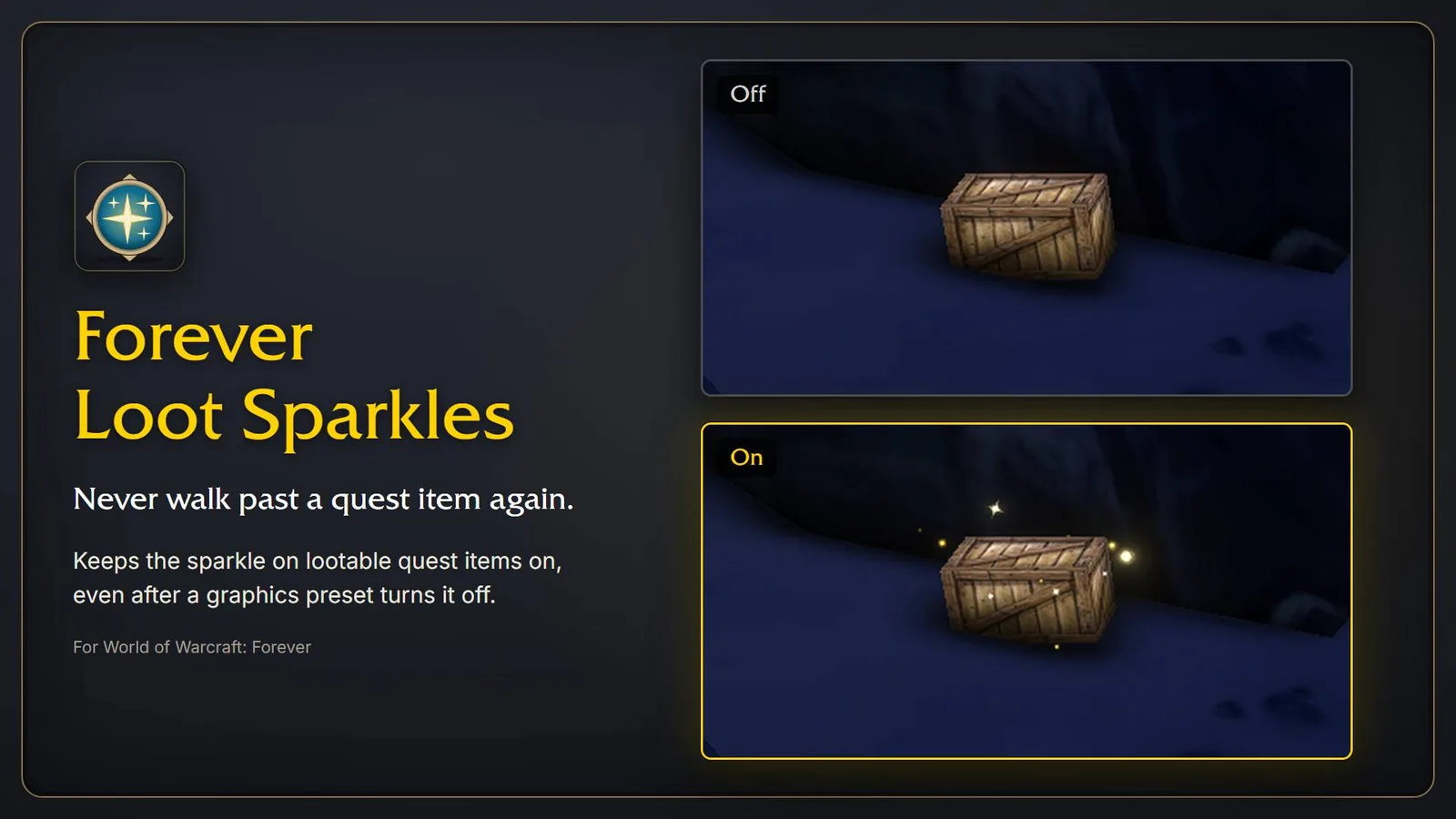
Screenshot by conoar from the Forever Loot Sparkles CurseForge page.
According to its CurseForge page, picking a graphics preset in Forever turns the outline mode back on and hides the sparkle on lootable quest items such as crates, sacks and plants. Forever Loot Sparkles notices the change and switches the sparkle back on about a second later. It also checks at login and waits until combat ends.
It can also put golden glints on the herb or ore vein you approach, with the game’s gathering icon above it: dim out of reach, bright in reach, grey when your Herbalism or Mining skill is too low. The license is GPLv3; the latest file is v1.3.0 from October 21.
Pros
- Fixes one specific Forever problem: graphics presets hiding the quest-item sparkle.
- Glints on herbs and ore veins, plus optional ones on quest objects, all set under Esc → Options → AddOns.
- The second most downloaded addon on this list.
Cons
- The gathering glints use Blizzard’s soft targeting, so they reach only about 15 yards.
- Per the CurseForge gallery, switching the quest-item sparkle off again needs a game restart.
3. Node Sight: what that minimap dot is
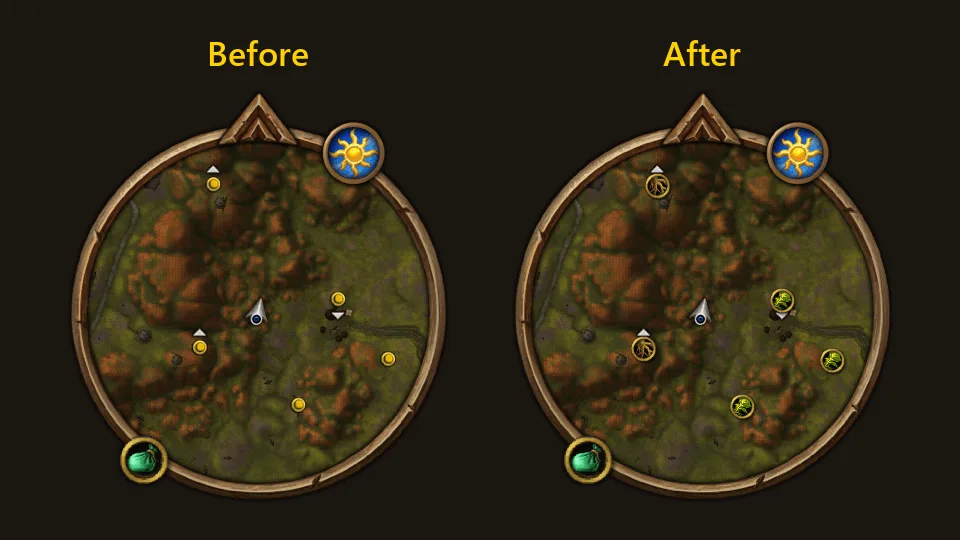
Screenshot by Krelock from the Node Sight CurseForge page.
Node Sight puts the herb’s or ore’s own picture on each gathering dot on your minimap, so you know what it is without hovering over it. A dot turns red when your  Herbalism or
  Mining is too low, and the tooltip names the skill it needs. An arrow to the nearest node and sparkles on nodes in front of you are both off by default. Version 1.5.0 came out on October 30. The same author made Enemy Frames, listed further down.
Pros
- You can read every gathering node on the minimap without hovering over it.
- Red dots show the nodes your skill cannot gather yet.
- Updated October 30, the most recent file on this list together with Social Diary.
Cons
- Unlike GatherMate, it does not remember old nodes; it shows the ones that are up right now.
- The author, u/MaxTheBunnie, notes that the sparkles change some game settings.
- The author’s disclaimer says AI tools were used.
4. Musca Auras: WeakAuras for Forever
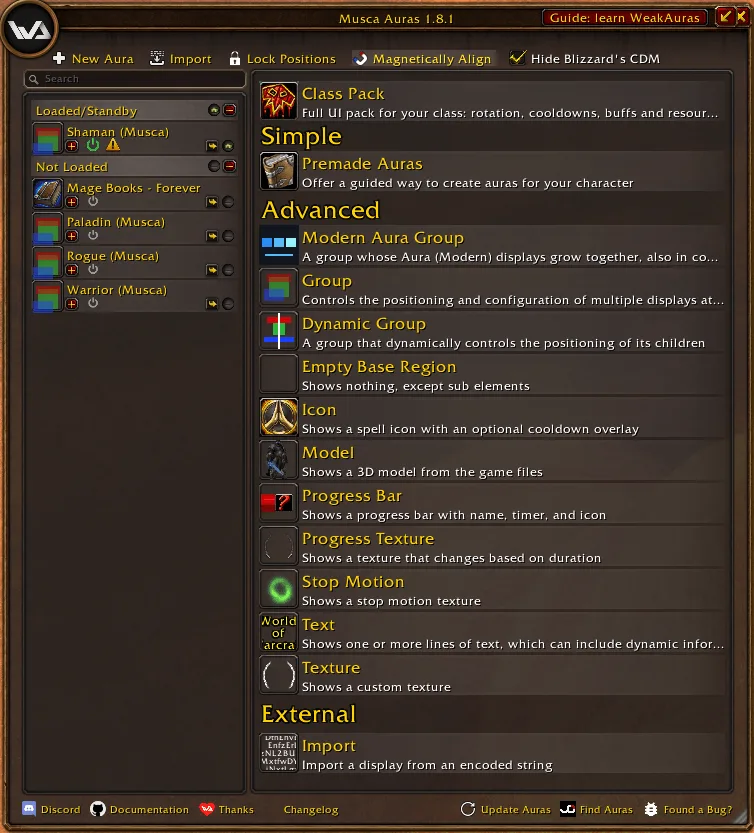
Screenshot by Dldvlpr from the Musca Auras CurseForge page.
When we checked the addons that list a Forever build on October 27, WeakAuras itself had none. Musca Auras is a WeakAuras fork for WoW Forever that its CurseForge page says keeps working in combat, with a one-click HUD for all nine classes. It is GPLv2, and version 1.14.0 is from October 22.
Its developer also built an Aura Builder site that checks an aura string and says whether it will work on Forever before you import it.
Pros
- The closest thing to WeakAuras on Forever that we found.
- A ready-made HUD for each of the nine classes.
- The Aura Builder site checks an aura string before you import it.
Cons
- In the October 29 post, the developer says the exported auras have not been tested in the game yet.
- Not every WeakAuras string will work; that is why the Aura Builder check exists.
5. NeedRoll: loot tables without the dropdowns
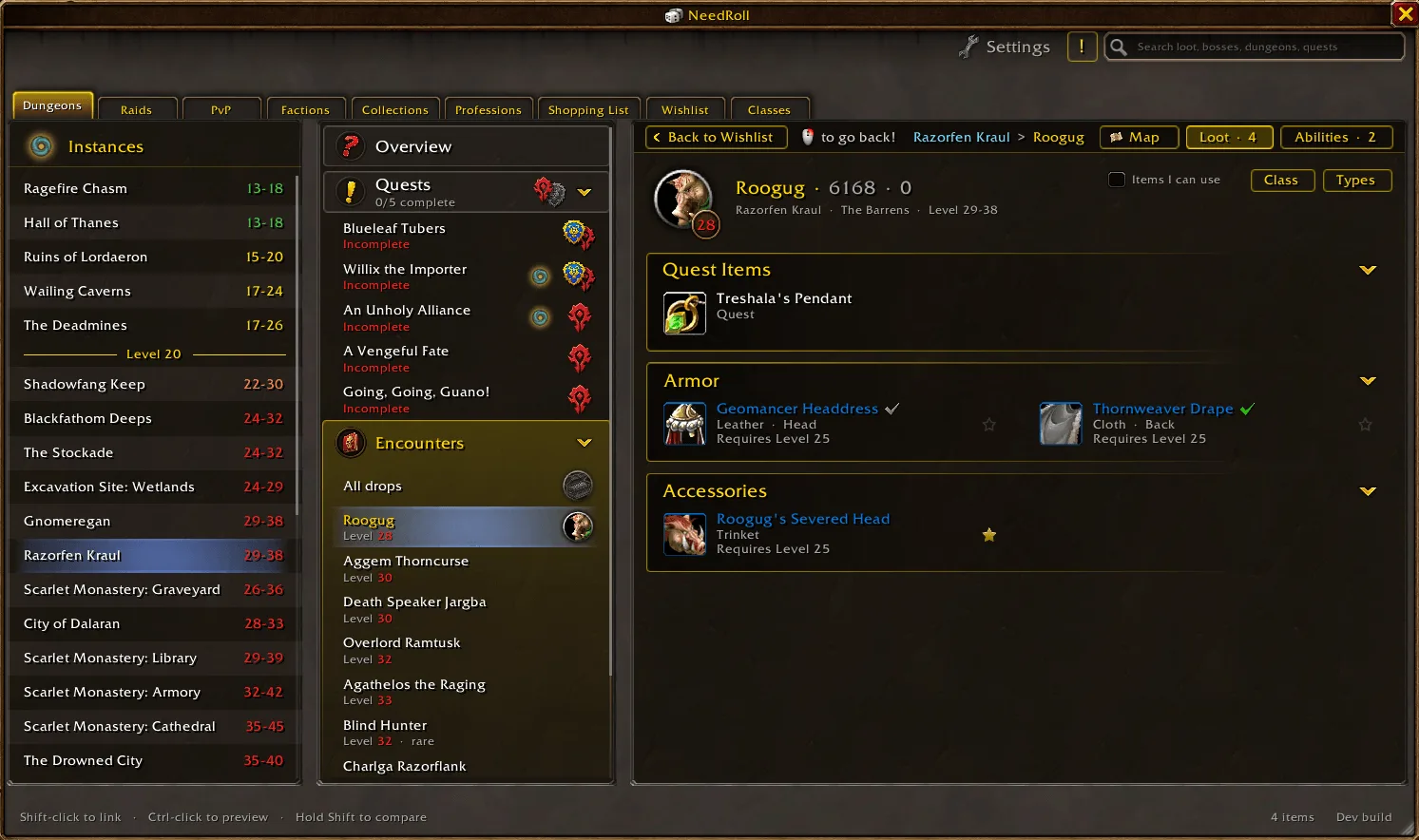
Screenshot by flowmotion_x from the NeedRoll CurseForge page.
NeedRoll is an AtlasLoot-style loot browser with tabs for Dungeons, Raids, PvP, Factions, Collections and Professions. Its author, u/PLAYBoxes, says the drop tables started from the cmangos classic database and were updated for the changes Forever made. The CurseForge gallery also shows dungeon quests, raid attunements and talent trees. The latest file is v0.16.2-forever from October 23.
Pros
- One window for dungeon and raid loot, dungeon quests and attunements.
- The author says the tables were updated for Forever’s changes.
Cons
- The data started from the cmangos Classic database; Realm First has not compared it with our own item pages.
- The author says AI coding was used, mostly for the interface; none of the art is AI-generated.
6. Glowing Bars: the button you forgot to press
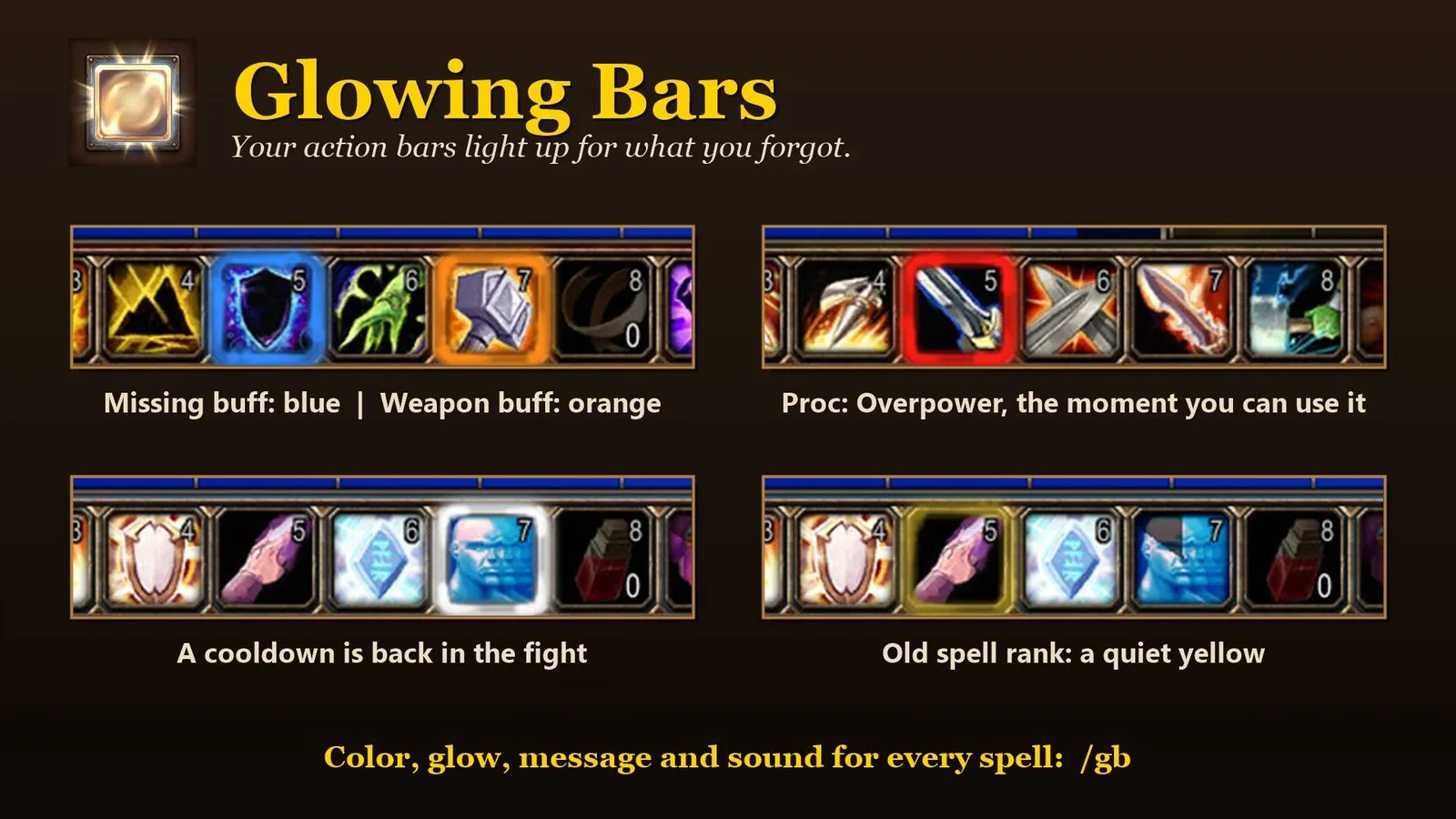
Screenshot by vattiss from the Glowing Bars CurseForge page.
Glowing Bars makes an action button glow when you need it: a missing buff or weapon buff, a cooldown that is ready again in a fight, a proc such as Overpower, Revenge, Execute or Victory Rush, a spell left at an old rank, or a reagent running low. /gb opens the colors, opacity, messages and sounds for each reminder. It is MIT-licensed, and version 1.6.0 is from October 29.
Pros
- Works on the action bars you already have; it adds no windows or extra bars.
- Covers buffs, procs, cooldowns, old spell ranks and reagents in one addon.
Cons
- The author says most of the code was written by Claude to an architecture they designed, and that they review every change.
7. PrettyTooltip: tooltips you can read at a glance
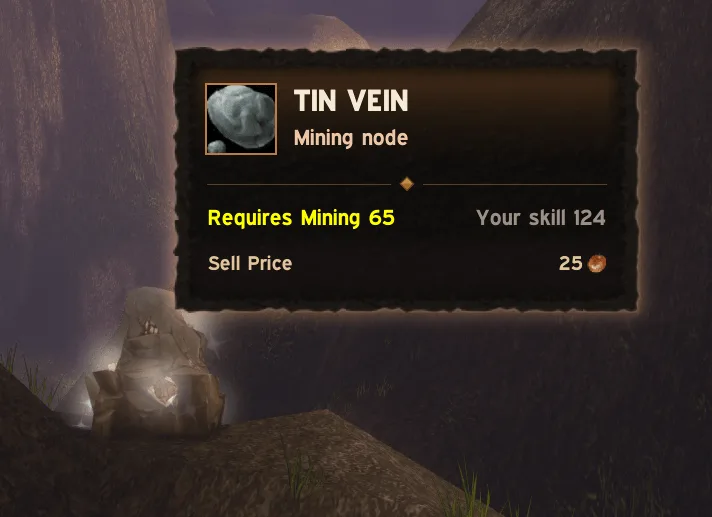
Screenshot by FallenShard from the PrettyTooltip CurseForge page.
PrettyTooltip replaces the look of the game’s tooltips. It shortens long equip effects and colors lines by spell school, and it has a lite mode. Its author, FallenShard, made a smaller version for personal use in 2020. MIT, v1.3.7-forever from October 23.
Pros
- Shorter equip effects and lines colored by spell school.
- A lite mode for players who want a lighter change.
- Open source under the MIT license.
Cons
- The author says around 99% of the new code is LLM-generated.
8. Keep or Toss: Forever: what is this item for?
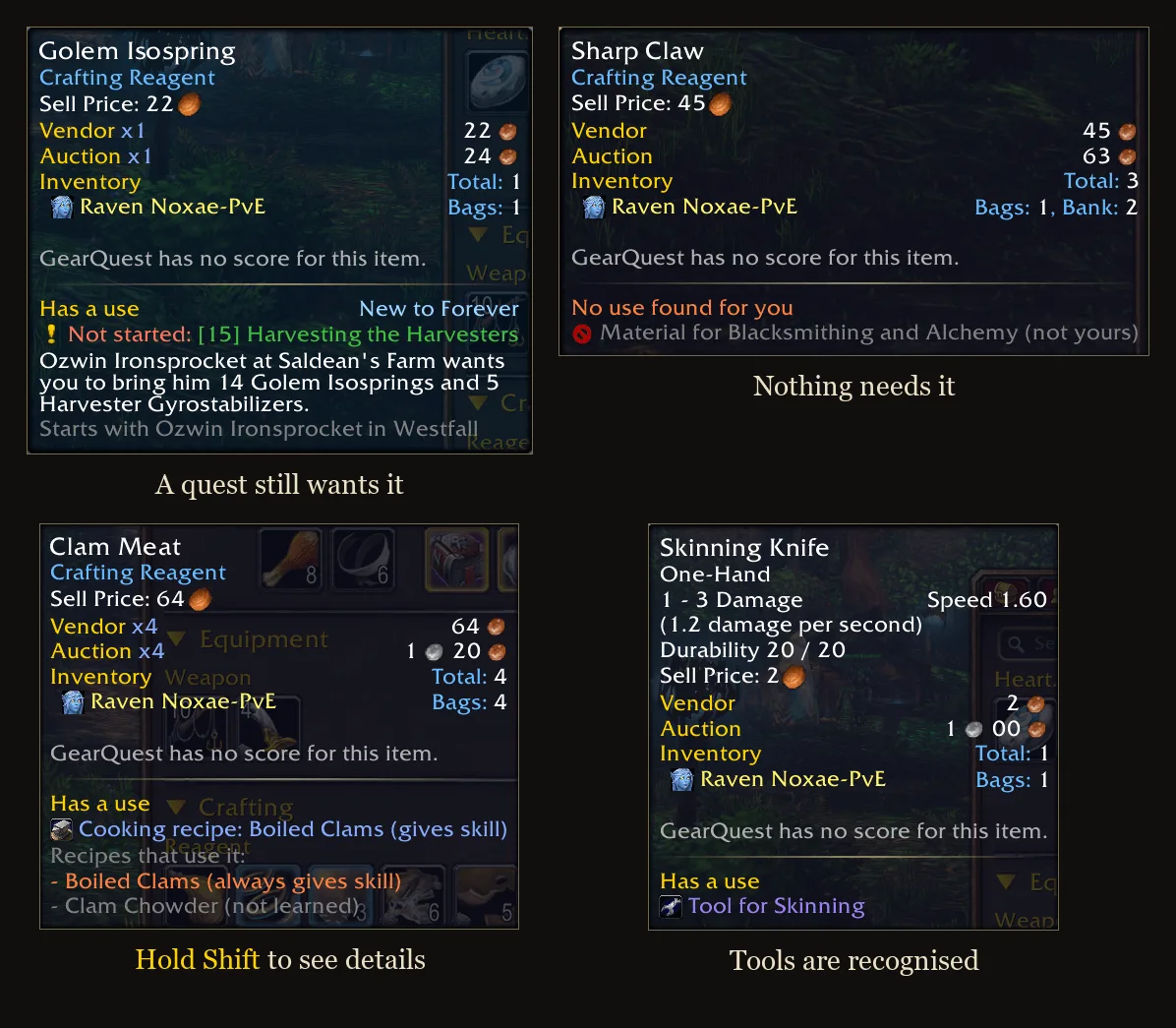
Screenshot by Aquary from the Keep or Toss: Forever CurseForge page.
Keep or Toss adds a short section to an item’s tooltip saying whether your character still has a use for it and why: a quest you have not picked up yet, one of your professions, an alt, or nothing. Items that are new in Forever get a blue outline and are never called useless, since little is known about some of them yet. A separate page sorts everything in your bags and bank by reason.
Pros
- Tells you why to keep an item, not only that you should.
- Never sells or deletes anything.
- Careful with Forever’s new items: they are never marked useless.
Cons
- Quest information comes from Questie, and bank and alts need Syndicator.
- Version 1.3.0 from October 14 is the oldest file in this top ten.
9. Social Diary: who you met on the way to 60
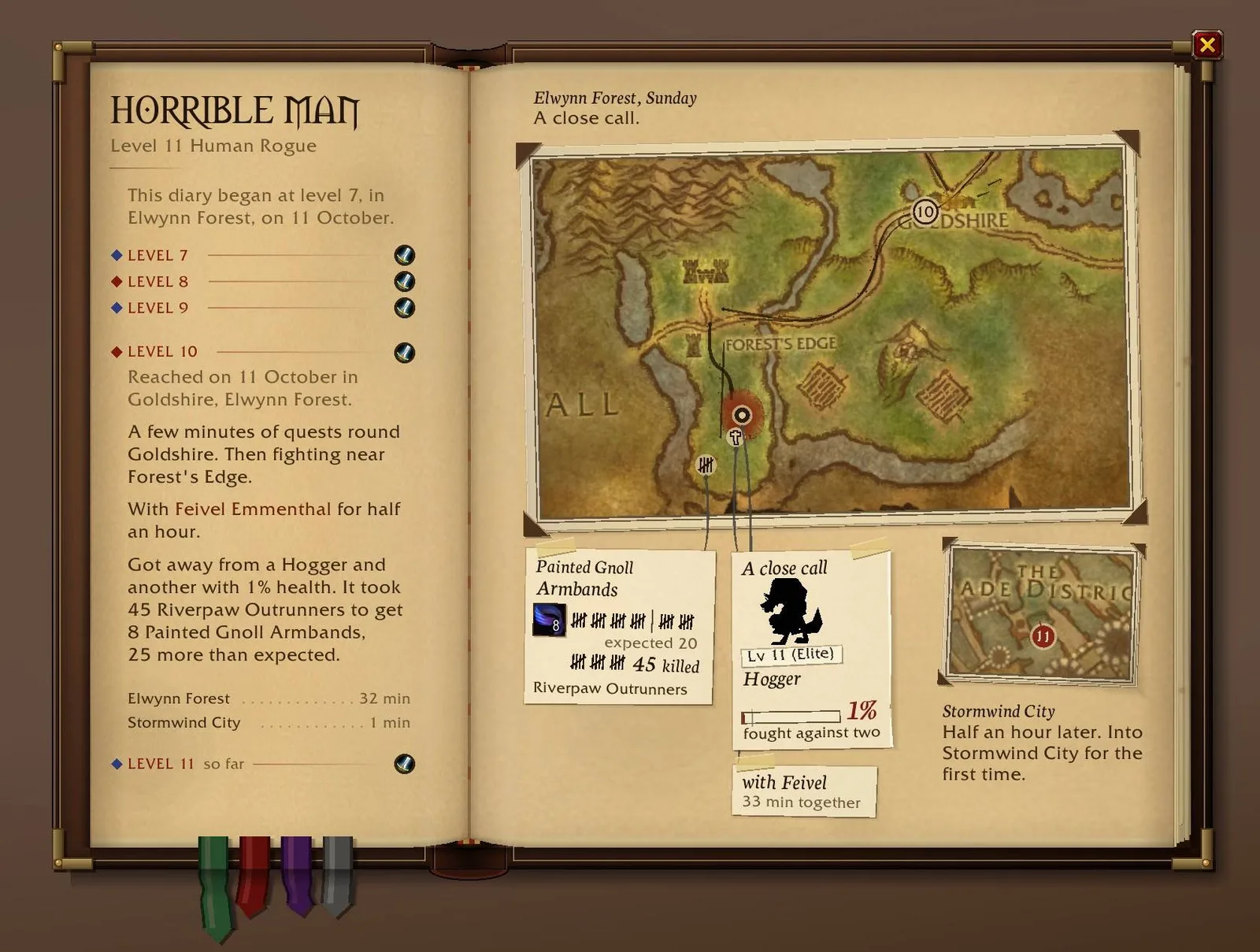
Screenshot by captainkaba from the Social Diary CurseForge page.
Social Diary keeps a timeline for each player you add: where you first met, what you talked about, what you did together. It also notices the players around you in the world, so you can look someone up after an hour of questing together. The author says it records moments such as a first blue item rather than kill counts. MIT, version 2.0.0 from October 30.
Pros
- Turns the people you meet while leveling into a diary you can look back on.
- The October 13 post has 1,784 upvotes, the second most on this list.
Cons
- It records the players around you; the top replies on Reddit are mostly surveillance jokes.
- The author says the addon was developed with AI help.
10. Happy Camper: find a camp with the buffs you want
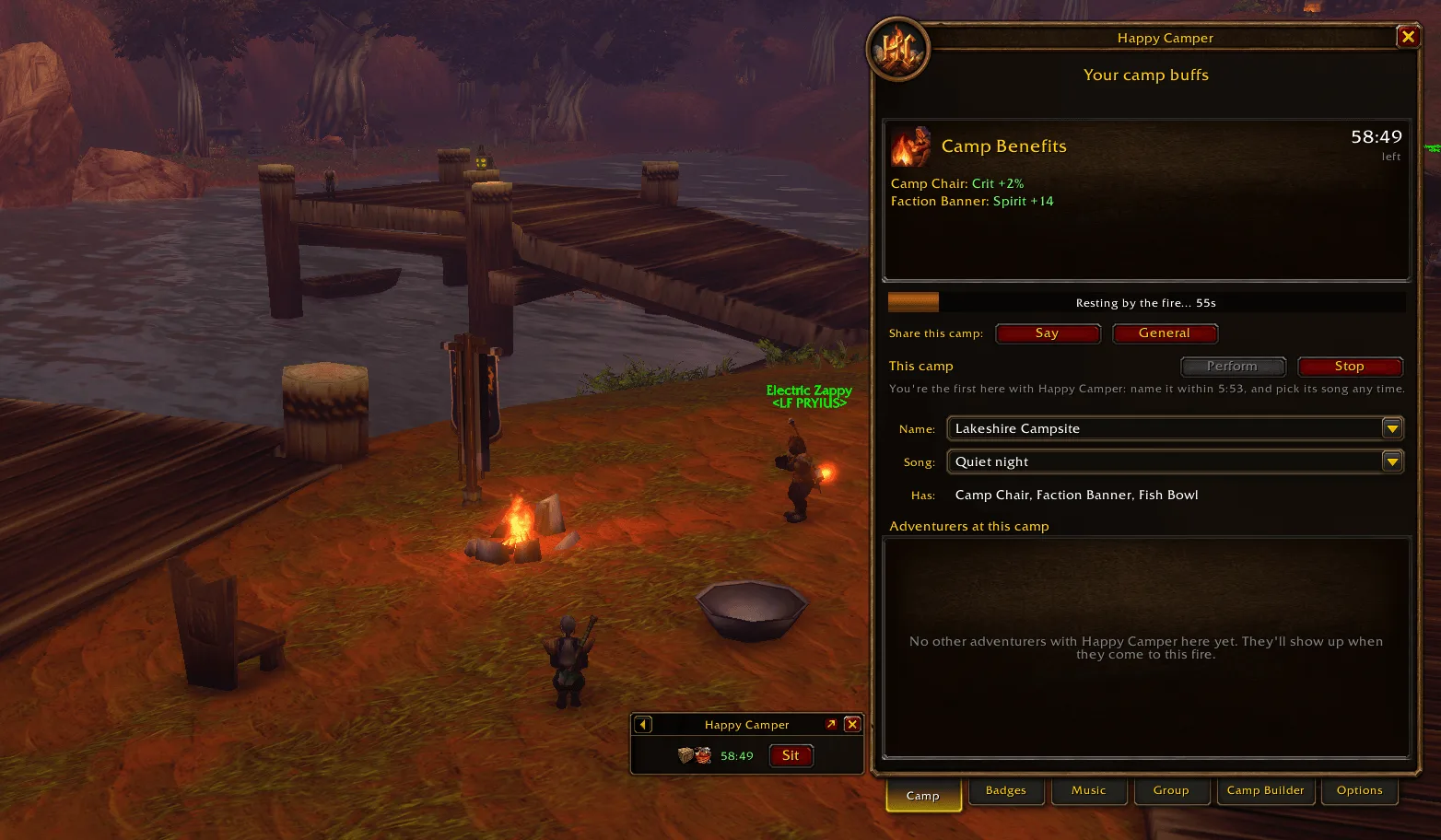
Screenshot by Torridon from the Happy Camper CurseForge page.
Camping is new in Forever; our camping guide explains the system. Happy Camper shares campfires on the map between its users and shows what is placed at each camp. You can ask players in the zone to bring the buffs you want, and a group can plan camp buffs against class buffs. Camp leaders can play music for other users, and everyone collects badges.
Pros
- Shows where camps are and what each one offers.
- Lets you ask the zone for the camp buffs you want.
Cons
- It only sees camps that other Happy Camper users have started or passed.
- The author calls it a work in progress; version 0.8.8 is from October 20.
Also worth a look
These authors also posted on Reddit and have a Forever file on CurseForge. They missed the top ten on downloads or overlap with an addon above.
| Addon | What it does | Downloads |
|---|---|---|
 DaylightUI DaylightUI |
A full UI suite built only for Forever | 9,232 |
 FlareUI FlareUI |
Builds on Forever’s own UI instead of replacing it | 4,702 |
 Lueur Lueur |
Glow on ore, herbs,  fishing bobbers, chests and quest objects within 15 yards fishing bobbers, chests and quest objects within 15 yards |
28,435 |
 High Fidelity World Map High Fidelity World Map |
A sharper world map built from minimap data, with cave maps | 4,094 |
 Improved Forever Improved Forever |
Controller and gamepad extras: radial wheels, vibration, a controller auction house | 2,989 |
 Enemy Frames Enemy Frames |
A clickable bar for every mob in the fight, even in combat | 1,394 |
 ShardSource ShardSource |
Gives every Warlock soul shard the name of the mob it came from | 986 |
 Parchmint Parchmint |
Bigger quest text and NPC dialogue | 503 |
Lueur overlaps with Loot Sparkles and Node Sight. ShardSource’s release post has 1,593 upvotes, the third most we found, but it is an addon for the Warlock only and its Forever file has not changed since September 21.
The established addons and how to install them
New addons sit next to the established ones. Our addon check lists which of Questie, Guidelime, RestedXP, BigWigs, Deadly Boss Mods, Plater and Bartender4 ship a Forever build, and the best leveling addon comparison covers the quest guides. To get any of them into the game, follow how to install addons for WoW Forever. Forever’s own interface already does some of what older addons did: see the HUD and Edit Mode guide and the damage meter guide. Blizzard has said that Forever keeps in-combat addon limits; our addon restrictions report has the source and what it leaves open.
FAQ
What is the best new map addon for WoW Forever? By downloads, OpenMap: 164,091 on October 31, 2026. High Fidelity World Map, built from minimap data, is an alternative with fewer downloads.
Is there WeakAuras for WoW Forever? WeakAuras had no Forever build when we checked on October 27. Musca Auras is a WeakAuras fork for Forever; its developer says exported auras are not yet tested in the game.
Do these addons work at launch? Every file above lists game version 1.60.1, the beta client. Check each CurseForge page for a new file after the November 4 launch.