
How to install Zygor for WoW Forever
To install Zygor for WoW Forever you need an active Zygor Elite subscription and the Zygor Client 4.13.2 or newer. Install the Forever game client in the Battle.net app, start it once and quit at the Gamerules Set screen, then update the Zygor Client and install the Forever entry. Zygor released the guides on ; plans are on Realm First's Zygor partner page.
WoW Forever · Leveling addons

Install Zygor for WoW Forever, step by step
These are the steps from Zygor's release post of and its user manual, with screens from the manual.
- Get Zygor Elite. Zygor's post says you need "an active Zygor Elite subscription" for the Forever guides. Elite costs $15 a month or $40 for three months.
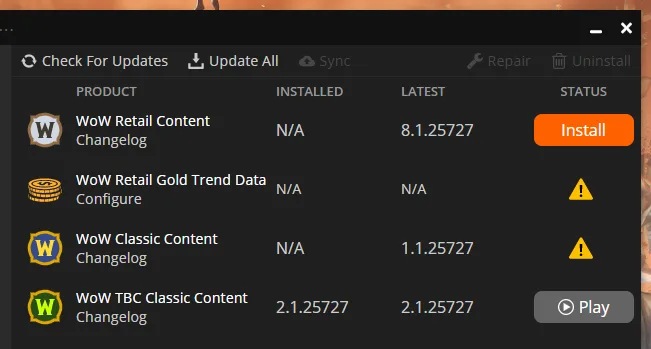
- Install the Forever game client and start it once. Download World of Warcraft: Forever in the Battle.net app, launch it and quit when you reach the Gamerules Set screen. Zygor says this "will auto-generate all the files needed to install the Forever Guides".
- Update the Zygor Client to version 4.13.2 or newer. Run or restart the Zygor Client, the desktop app, and it should update itself. Without it, download the client from the Members Area on zygorguides.com and log in with your Zygor account.
- Install the Forever entry. The updated client shows an entry for the Forever guides with an Install button. Zygor's manual asks you to keep the game closed while the client installs.
- Check Options / Directories. Zygor's post says you may need to configure the directory locations there; point them at the Forever client. On a Mac, Zygor says you may need to change the executable line, as the Mac fix shows.
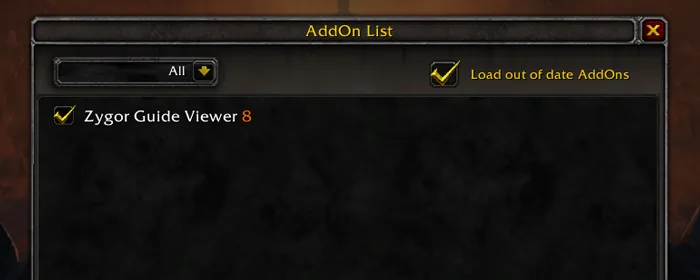
- Enable the addon in the game. Click the AddOns button in the bottom left corner after you log in, make sure Zygor's guide viewer is ticked and tick Load out of date AddOns, which Zygor recommends keeping on.
Zygor is a Realm First partner: Realm First earns a commission on Zygor Elite subscriptions through our link, which does not change the price.
Want a one-time purchase instead? Install RestedXP in four steps
RestedXP's addon is free and its Forever guide is a one-time purchase, not a subscription. These steps come from our install guide; RestedXP's own install page answered our requests with an access error (HTTP 403), so we could not re-read it.
- Get the addon. Download the Forever file of the free addon from CurseForge or GitHub.
- Install and enable it. Put it in the Forever client's AddOns folder by hand or with a manager, as our addon install steps show, then enable it in the AddOns list.
- Open it in game. Type
/RXPor/RXPG. - Load a bought guide. Sign in at account.restedxp.com and download the guide in the language you play in: English, German, French, Spanish, Portuguese and Chinese (Simplified).
Are Zygor guides available for WoW Forever?
Yes. Zygor's post of says its guides for World of Warcraft: Forever are "now officially released and available for download", a day before the game's November 4 launch. They need Zygor Elite and install through the Zygor Client, which Zygor's manual says runs on both PCs and Macs.
The guides are not finished. Zygor's Forever page says it has "only a partial update to the 1-60 experience" and calls the guides "a Work in Progress until further notice", because the beta stopped leveling at level 30: new guides cover levels 1 to 30, and 31 to 60 run on Zygor's Classic guides for now. It names leveling guides for Mount Hyjal, Riverglades, Shen'dralas, Dalaran and Zephras Isle, a Skyborne starter guide and four dungeon guides on day one. The latest Forever Guide Viewer build in Zygor's changelog is 1.6.37540, from November 5. Zygor for WoW Forever lists the coverage and its limits.
Zygor Forever guides not showing up on Mac
Zygor's post names one known issue: Mac users "may need to change the executable line" from "World of Warcraft Forever.app" to "World of Warcraft.app" under Options / Directories in the Zygor Client. Zygor does not say what goes wrong without the change. If the Forever guides do not show up on a Mac, check this line first, then go back to the guide list and install the Forever entry.
The open-source addon manager WowUp explains the name in its code change of October 18, 2026: the live Forever client "ships the retail Wow.exe binary" and is told apart from Retail by its install folder, so WowUp's Mac code gives Forever the same app name as Retail, "World of Warcraft.app". Zygor has not said more than the fix.
Zygor not showing up in WoW Forever: what to check
| Problem | What to do | Source |
|---|---|---|
 No Forever entry in the client | Restart the Zygor Client so it updates to 4.13.2 or newer. The client lists only the guides your account can use, so check that Zygor Elite is active. | Release post; manual, Installing Your Guides |
| Forever client never started | Start it once and quit at the Gamerules Set screen; Zygor says this creates the files its install needs. Then install the Forever entry again. | Release post |
| Installed, but not in the game | Zygor says you may need to configure the directory locations under Options / Directories. Check that they point at the Forever client's Interface/AddOns folder. | Release post; manual, Client Settings |
| Mac | You may need to change the executable line to "World of Warcraft.app" under Options / Directories. | Release post, known issues |
| Listed as out of date | Tick Load out of date AddOns at the top of the AddOns list. | Manual, Enabling The AddOn |
| Guides did not update properly | Click Repair in the Zygor Client: it matches your local files with the files on Zygor's server. Reinstall removes all your Zygor files, downloads a new copy of the guides and installs them fresh. | Manual, Installing Your Guides |
| Still stuck | Ask in the #forever channel on Zygor's Discord or contact Zygor Support. | Release post |
Where is the WoW Forever AddOns folder?
Inside the Forever client's own folder: World of Warcraft/_forever_/Interface/AddOns. We found no Blizzard or Zygor page that names it; the name comes from WowUp, whose code change of October 18, 2026 says "The live WoW Forever client installs to _forever_". Zygor's manual lists the folders of the other clients, such as _retail_ and _classic_era_, and WowUp keeps the Forever beta under _classic_beta_.
The Zygor Client normally finds the folder itself. If it does not, set the path under Options / Directories. How to install addons in WoW Forever shows how to open the game folder from the Battle.net app.
Install Zygor for Forever without the client
Zygor's manual offers a separate manual installation ZIP for WoW Forever, next to the Retail and Classic ones. Log in on zygorguides.com, download the Forever ZIP from Installing Zygor Guides Manually and extract all of its files into the Forever client's Interface/AddOns folder. Zygor calls this a fallback that "is neither automatic nor error proof" and has to be repeated "every time guides are updated or your licence needs renewal", so it recommends the client.
Is Zygor free for WoW Forever?
No. The Forever guides need Zygor Elite, which costs $15 a month or $40 billed every three months ($13.33 a month), in US dollars. The free Zygor Basic account does not include them. Is Zygor worth it for WoW Forever? compares the cost with a one-time guide.
| Plan | Price | Per month | Forever guides |
|---|---|---|---|
| Elite, monthly | $15 | $15 | Included |
| Elite, quarterly | $40 | $13.33 | Included |
| Zygor Basic | Free | Free | Not included |
Plans and the current Forever scope are on Realm First's Zygor partner page. We found no Blizzard statement on Zygor or other paid guides for Forever; Blizzard's addon rules covers what Blizzard has said.
Questions players ask
Answers checked .
How do I install Zygor for WoW Forever?
Get an active Zygor Elite subscription, install the Forever game client in the Battle.net app and start it once until the Gamerules Set screen, update the Zygor Client to version 4.13.2 or newer, then install the Forever entry in the client and enable the addon in the game's AddOns list.
Source: Zygor's release post of November 3, 2026 · The steps
Are Zygor guides available for WoW Forever?
Yes. Zygor posted on November 3, 2026 that its Forever guides are "now officially released and available for download". They need Zygor Elite and cover levels 1 to 30 so far; 31 to 60 run on Zygor's Classic guides until its Forever update.
Source: Zygor's release post and zygorguides.com/forever, read November 3, 2026 · Zygor plans on our partner page
Why are my Zygor Forever guides not showing up on Mac?
Zygor's release post lists one known issue for Mac users: they may need to change the executable line from "World of Warcraft Forever.app" to "World of Warcraft.app" under Options / Directories in the Zygor Client. Zygor does not say which symptom it causes, so check that line first when the guides are missing on a Mac.
Source: Zygor's release post of November 3, 2026 · The Mac fix
Which Zygor Client version do I need for WoW Forever?
Version 4.13.2 or newer. Running or restarting the Zygor Client should update it; without the client, download it from the Members Area on zygorguides.com.
Source: Zygor's release post of November 3, 2026
Do I need Zygor Elite for the Forever guides?
Yes. Zygor's post asks for an active Zygor Elite subscription, which costs $15 a month or $40 for three months. The free Zygor Basic account does not unlock the Forever guides.
Source: Zygor's release post and zygorguides.com/join, read November 3, 2026 · Zygor Elite plans on our partner page
Where does Zygor install in WoW Forever?
In the Forever client's Interface/AddOns folder, which the addon manager WowUp places under _forever_ in the World of Warcraft folder. Zygor's release post says you may need to configure the directory locations under Options / Directories in the Zygor Client; point them at the Forever client.
Source: WowUp on GitHub and Zygor's release post, read November 3, 2026 · The AddOns folder
Can I install Zygor for WoW Forever without the client?
Yes. Zygor's manual offers a separate manual installation ZIP for WoW Forever, extracted into the Forever client's AddOns folder. Zygor calls it a fallback that has to be repeated every time the guides are updated.
Source: Zygor's manual, read November 3, 2026 · Manual install
Sources
- Zygor Guides, "Zygor's World of Warcraft: Forever Guides Are Now Available!", posted and read the same day. Release, Elite requirement, install steps, client 4.13.2, the Mac known issue and where to get help.
- Zygor user manual, read November 3, 2026: Installing Your Guides (PC and Mac, close the game, Repair and Reinstall), Enabling The AddOn (AddOns button, Load out of date AddOns), Installing Zygor Guides Manually (Forever ZIP, other clients' folders) and Client Settings (AddOns folder).
- Zygor Guides, World of Warcraft: Forever: zygorguides.com/forever, read November 3, 2026. The partial-update disclaimer and the covered zones and dungeons.
- Zygor Guides, Zygor Elite plans: zygorguides.com/join, read November 6, 2026.
- WowUp on GitHub, read November 3, 2026: "Add WoW Forever client support" (October 18, 2026) and its folder names, with
WOW_FOREVER_FOLDER = "_forever_".
Realm First has not installed Zygor on a Forever client; this guide reports what Zygor and WowUp publish.